
Zombie love story video generator
AI Zombie Trend Video Generator
Two photos in. A 15-second zombie love story out. One of you has turned, the other cannot pull the trigger, and the last thing you see is your best day together. No app, template or prompt; ready in minutes.
- 1 free video every day
- 2 photos, no app or prompt
- 15 seconds with sound
- 16:9 or 9:16
- Couple or pet version
Sound included
1
Cast your story
One of you holds the gun. The other has turned.
Clear, front-facing photos with the whole head in frame. One person per photo.
2
Pick quality and format
Required: 6 credits6 free credits daily
Usually a few minutes. Failed videos are refunded automatically.
ONE TURNS. ONE CAN’T SHOOT.16:9
Sample made with this generator · Couple · 16:9. Both people are AI characters.
The cabin. The gun.
The wheat field.
15 seconds, with sound. The shot list is built in.
All it needs is your two photos.
Your videos
Sign in to create and keep your videos.
How it works
How to do the AI zombie trend in 3 steps
No editing app, no prompt to write. The shot list is built in.
- 01
Add two photos
One of the person who holds the gun and one of the person, or pet, who turns. Clear, front-facing photos work best. JPG, PNG or WebP up to 4 MB.
- 02
Pick quality and format
Choose 480p, 720p or 1080p depending on the model, in 16:9 like the trend clips or 9:16 to fill a phone screen. The credit cost is shown before you create.
- 03
Download and post
Your 15-second video is usually ready in a few minutes. You can close the tab meanwhile. Download the MP4 and post it to TikTok, Reels or Shorts.
The shot list
What happens in your AI zombie video
Every video follows the beats of the trend, so yours cuts the same way as the ones in your feed.
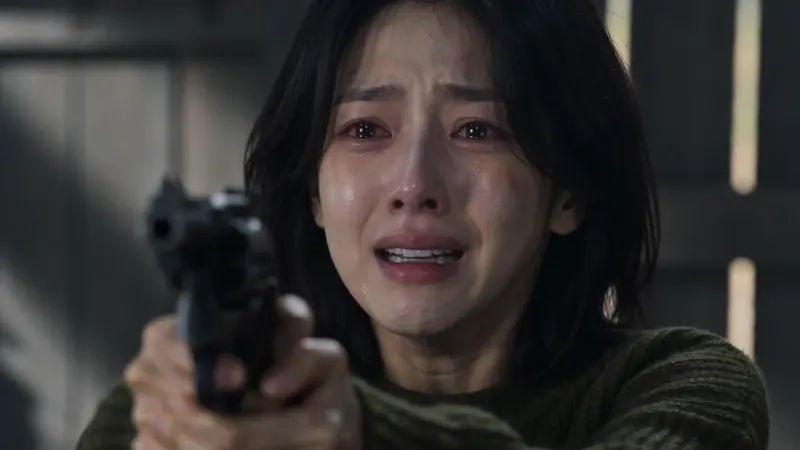 0–4 s
0–4 sThe cabin
A tearful close-up behind a raised gun while the one who turned walks closer across the room.
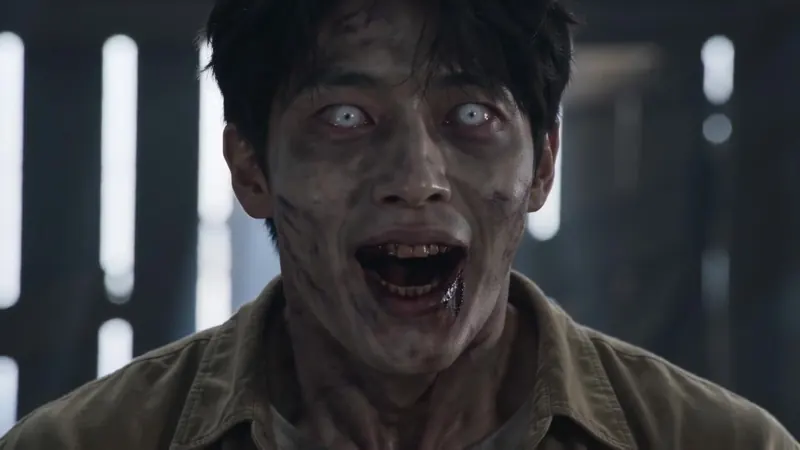 4–6 s
4–6 sThe face
An extreme close-up of the zombie: ashen skin, clouded eyes, a silent snarl.
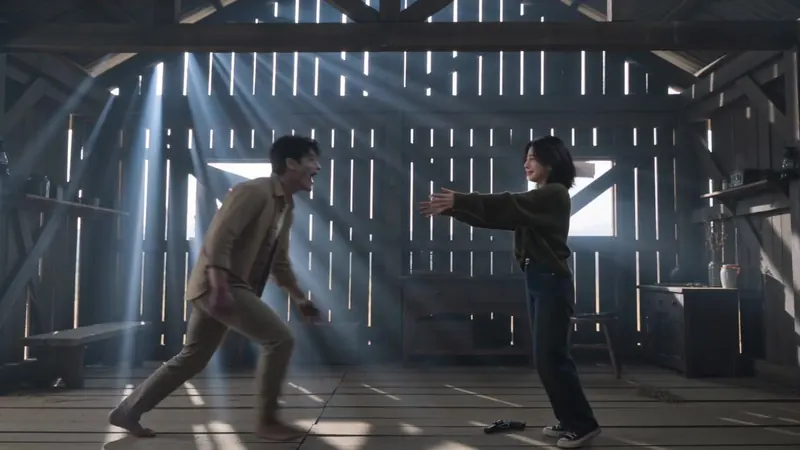 6–10 s
The leap
The gun drops, arms open, eyes close. The zombie sprints across the cabin and leaps.
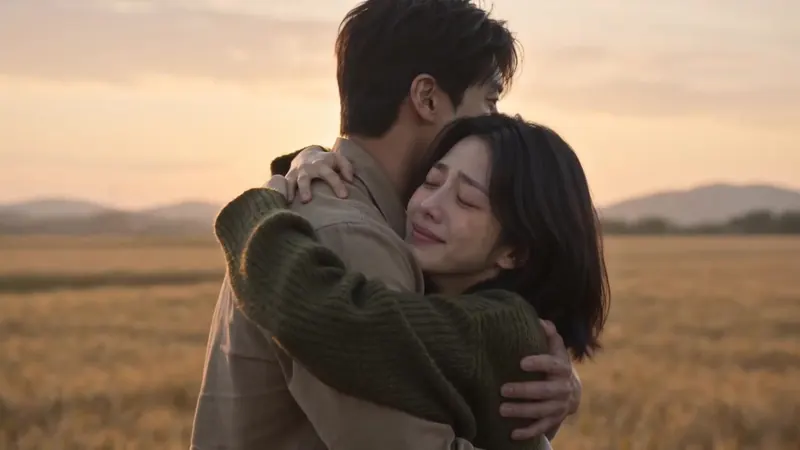 10–15 s
The memory
Mid-air, the film cuts to a golden wheat field and the same leap lands as a hug, both of you alive.
Examples
AI zombie trend video examples
Made with this generator, sound included. Both people in each clip are AI characters. Press play.
Still a good boy
Make your ownAbout the trend
What is the AI zombie trend?
The AI zombie trend, also called the zombie love story, is a short AI film that took over TikTok and Reels in late September 2026. Someone you love has turned. You aim a gun at them, crying, and cannot fire.
You drop the gun and open your arms, the zombie leaps, and in mid-air the film cuts to your happiest memory together: the same leap landing as a hug in a golden wheat field. Couples, best friends, parents and pets all get the same treatment.
With Zombie Trend AI your two photos become the cast. No app template, no prompt and no editing.
The trend explained, with the full shot list How to do the zombie trend, every methodWhy Zombie Trend AI
An AI zombie video maker built for the trend
Everything you need to turn two photos into the clip everyone is crying over.
Your faces, not lookalikes
Your two photos are the cast. The AI aims to keep each face, hairstyle and outfit recognizable from the cabin to the wheat field.
Couple, friends or family
Partners, best friends, siblings, a parent and child who are both adults: whoever you would never be able to shoot.
Sound included
Cabin ambience, breathing and a soft score for the memory scene come with every video. No licensed song, so you can add any trending sound when you post.
The full trend shot list
Standoff, zombie close-up, lowered gun, the leap and the wheat-field hug. 15 seconds, already written for you.
Made for every feed
16:9 for the letterboxed look of the original clips, or 9:16 to fill the screen on TikTok, Reels and Shorts.
No watermark
Every video downloads as a clean MP4 with audio. No logo on top, ready to post.
Free to start
A free zombie trend video every day
Sign in with Google and get 6 free credits every day. A standard 15-second 480p video costs 6 credits, so that is one video a day, no card needed. Unused credits don’t stack; your balance tops back up each day.
Make your free videoFAQ
AI zombie trend FAQ
Everything to know before you make yours.
What is the AI zombie trend?
A short AI-made film that spread on TikTok and Reels in late September 2026. Someone you love has turned into a zombie. You aim a gun at them in tears, cannot fire, lower it and open your arms, and the clip cuts to a happy memory of the two of you in a golden wheat field.
How do I make an AI zombie trend video?
Add one photo of the person who holds the gun and one of the person or pet who turns, pick quality and format, and press Create. The shot list is built in, so there is no prompt to write and nothing to edit.
Can my pet be the zombie?
Yes. Switch the studio to Pet and use a photo of your dog or cat as the second photo. Your pet turns in the cabin and is its healthy self again in the wheat field.
Which photos work best?
Front-facing photos with the whole head in frame and even light on the face. One person or pet per photo, no sunglasses, masks or heavy filters. JPG, PNG and WebP up to 4 MB.
Does the video have sound?
Yes. The AI generates cabin ambience, breathing and a soft score for the memory scene. There is no licensed song in it, so you can add any trending sound when you post.
Is the zombie gory?
The video asks for ashen grey skin, clouded eyes and dark veins, with no blood or wounds. Results vary a little from run to run.
How long does it take?
Usually a few minutes for a 15-second video. You can leave the page while it renders; the finished video waits in your studio when you come back. Up to two videos can be generated at the same time.
Is the AI zombie trend generator free?
It’s free to start. Sign in with Google and you get 6 free credits every day, enough for one 15-second video. Unused credits don’t stack: your balance tops back up to 6 each day. The exact credit cost of every option is shown before you create.
Can I use photos of other people?
Only photos of yourself, your own pet, or adults who agreed to appear. No photos of children, celebrities or other public figures, and nothing that could mislead people or harm someone.
Is there a watermark?
No. Your downloaded MP4 has no logo or watermark.
What happens to my photos?
Your photos are used only to create your video and stored to support processing, delivery and troubleshooting. We do not publish your photos or videos. See our Privacy Policy for details.
Are my photos used to train AI?
No. Your photos are used only to generate your video. We do not use them to train AI models and we never publish them.
Do I need an app or a CapCut template?
No. Everything runs in your browser on phone or desktop. Upload two photos, press Create, and download the MP4.
What happens if a video fails?
If a generation fails, the credits for that video are returned to your balance automatically.
One of you turns. The other cannot shoot.
Two photos and a few minutes. The cabin, the gun and the memory are already written.
Create your video